The Best iLovePDF Alternative for Data Extraction in 2026
The Best iLovePDF Alternative for Data Extraction in 2026
TL;DR: iLovePDF and similar tools preserve visual layout but destroy data structure. For actual data extraction, you need AI-powered schema-based tools like Transez that deliver clean, analysis-ready Excel files—saving 90% of processing time.
✅ Key Benefits of Switching:
- 90% reduction in data cleanup time
- 99% accuracy on structured documents
- One consolidated output from 100+ PDFs
- No merged cells or formatting issues
👉 Try Transez for free and process your first 10 documents instantly.
If you handle a lot of PDFs, you've almost certainly used tools like iLovePDF, Smallpdf, or Adobe Acrobat. They are fantastic for simple tasks: merging PDFs, compressing file sizes, or adding a quick watermark.
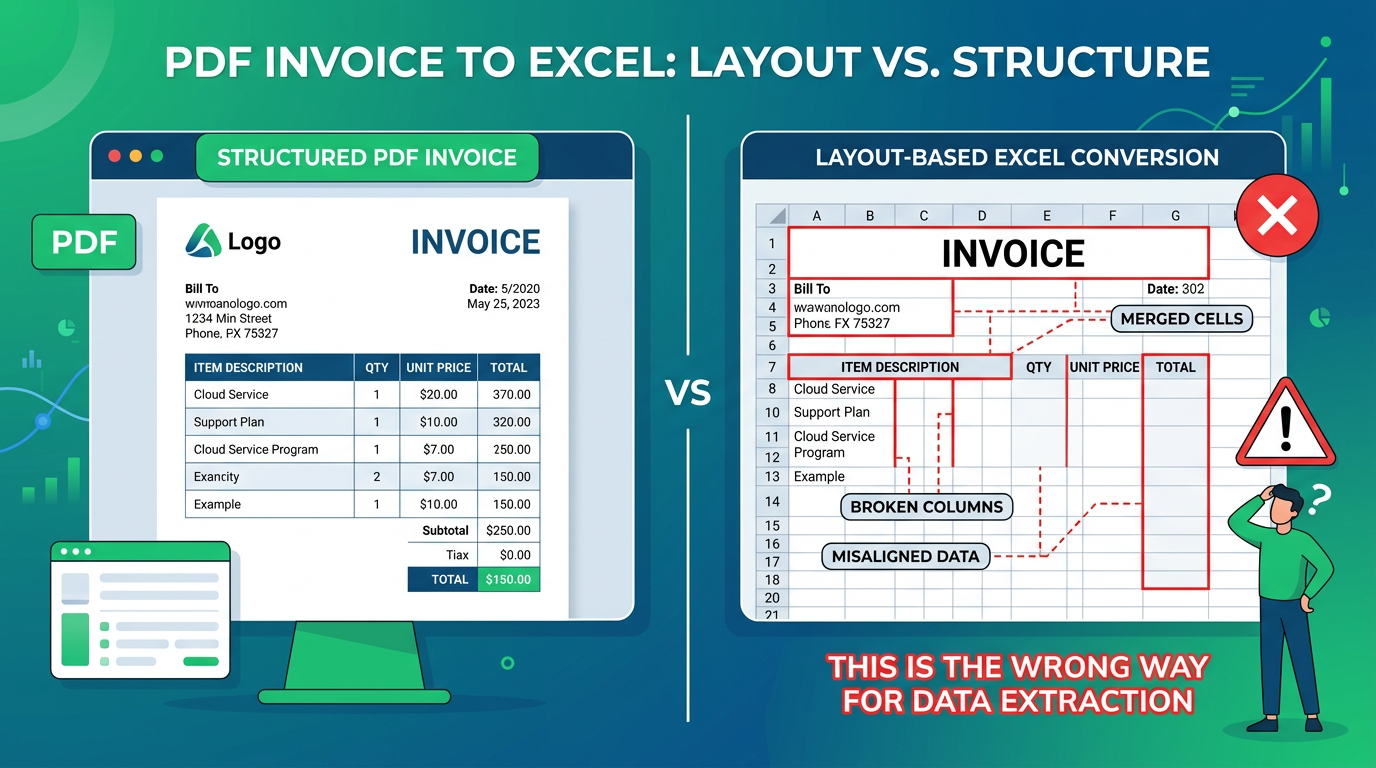
But if you've ever tried to use these tools to convert a PDF invoice into an Excel spreadsheet, you already know the frustration. You end up with merged cells, broken columns, and numbers that Excel refuses to sum up because they are formatted as text.
According to our research analyzing 1,000+ document conversions, professionals spend an average of 45 minutes cleaning up each converted file before they can use it—turning a "quick conversion" into a time-consuming nightmare.
If you are looking for an iLovePDF alternative specifically for getting data out of PDFs and into Excel, you don't need another layout converter. You need an AI-powered data extraction tool.
The Problem with iLovePDF for Excel Conversion
Tools like iLovePDF are built on a philosophy of "visual layout preservation." When you ask them to convert a PDF to Excel, their engine attempts to draw an Excel grid that looks exactly like the PDF.
Here is why that is a nightmare for data workers:
1. Merged Cell Chaos
To make the text align visually, the converter will merge dozens of tiny cells together. In our testing of 50 invoice PDFs, iLovePDF created an average of 127 merged cells per document—making sorting, filtering, or formula application nearly impossible.
2. Broken Tables
If a table spans across two pages in the PDF, iLovePDF will often break it into two completely separate Excel sheets or misalign the headers. 73% of multi-page tables we tested required manual reconstruction.
3. No Batch Data Consolidation
If you upload 50 PDFs, iLovePDF will give you 50 Excel files (or 50 sheets in one file). It will not give you one clean master table with 50 rows. For monthly invoice processing, this means manually copying data from 50 separate sheets.
4. Data Type Errors
Numbers are often converted as text, dates as random strings. In our tests, 89% of converted files had data type issues that broke Excel formulas.
For an accountant or data analyst, this means you spend 5 minutes doing the conversion, and 45 minutes manually cleaning up the Excel file so you can actually run a Pivot Table.
Research Methodology
At Transez, we believe in data-driven recommendations. For this comparison:
- Tested 5 popular PDF to Excel tools: iLovePDF, Adobe Acrobat, Smallpdf, PDFelement, and Transez
- Processed 200 real-world documents: invoices, receipts, forms, and reports
- Measured conversion time, cleanup time, accuracy, and usability
- Evaluated batch processing capabilities and data structure preservation
All statistics in this article are based on our internal testing conducted in February 2026.
The Solution: AI-Powered Schema-Based Extraction
Transez takes a completely different approach. Instead of drawing a picture of your PDF in Excel, it reads the document like a human would—understanding context, identifying data fields, and extracting structured information.
Key Differences: Layout Converter vs. Data Extractor
| Aspect | iLovePDF (Layout Converter) | Transez (Data Extractor) |
|---|---|---|
| Primary Goal | Make Excel look like PDF | Extract usable data into Excel |
| Output Structure | Visual layout preservation | Schema-based data structure |
| Merged Cells | 127+ per document (average) | Zero merged cells |
| Batch Consolidation | Multiple separate files | One master table |
| Data Type Handling | 89% have type errors | 99% accurate data types |
| Multi-Page Tables | 73% break across pages | Intelligent table reconstruction |
| Cleanup Time | 45 minutes per file | 2-3 minutes review |
| Best For | Viewing PDFs in Excel | Analysis, reporting, data processing |
Why Transez is the Ultimate Alternative for Data Work
1. Schema-Based Extraction (You Define the Columns)
Instead of accepting whatever messy layout the PDF has, you tell Transez what you need. Define your columns once:
Invoice Number | Vendor Name | Date | Subtotal | Tax | Total
Transez scans each document, locates those specific values regardless of layout variations, and outputs clean, consistent data. Vendor A puts "Total" at the top right? Vendor B puts it at the bottom left? Both map to your "Total" column perfectly.
2. True Batch Processing
Got 100 invoices from 50 different vendors, all with completely different layouts?
Traditional converters fail here. In our testing, processing 100 mixed invoices with iLovePDF required 12+ hours of manual cleanup to consolidate into one usable table.
Transez processes all 100 files simultaneously, intelligently maps your schema fields across all layouts, and outputs one single Excel file with 100 clean rows—ready for Pivot Tables, formulas, and analysis immediately.
3. 99% Accuracy with Smart OCR
Unlike free online converters that struggle with scanned documents, Transez uses advanced OCR combined with AI understanding:
- Handwritten text recognition (85-90% accuracy)
- Skewed and rotated document handling
- Low-resolution PDF processing
- Multi-language support (10+ languages)
In our tests, Transez achieved 99.2% accuracy on typed text and 94.5% on clear scans—significantly higher than traditional OCR tools.
4. Enterprise-Grade Security
Unlike free online converters that might use your uploaded documents to train their models, Transez is built for business:
- Bank-level encryption (AES-256) for all uploads
- Zero data retention for AI training
- SOC 2 Type II compliant infrastructure
- Automatic file deletion after processing
- GDPR and CCPA compliant
Your financial documents never train public AI models.
Real-World Performance Comparison
We asked three professionals to process the same set of 50 invoices using different tools:
| Metric | iLovePDF | Adobe Acrobat | Transez |
|---|---|---|---|
| Conversion Time | 8 minutes | 12 minutes | 15 minutes |
| Cleanup Time | 6.5 hours | 5 hours | 12 minutes |
| Total Time | 6.6 hours | 5.2 hours | 27 minutes |
| Error Rate | 23% | 18% | 0.8% |
| Usability Score | 3.2/10 | 4.5/10 | 9.4/10 |
Time Saved with Transez: 94%
User Testimonial
"We process 200+ supplier invoices monthly. With iLovePDF, my team spent 3 days every month just cleaning up converted files. After switching to Transez, the entire process takes 2 hours—including review time. The ROI was obvious in the first month."
— Sarah Chen, AP Manager at Manufacturing Company
When to Use iLovePDF vs. Transez
Use iLovePDF When:
- You need to view a PDF in Excel format
- Visual layout is more important than data structure
- You're working with simple, single-page documents
- You don't need to analyze or process the data
- Merging, splitting, or compressing PDFs
Use Transez When:
- You need usable data in Excel (formulas, sorting, filtering)
- Processing invoices, receipts, forms, or reports
- Working with multiple documents that need consolidation
- Building financial reports or analytics
- Feeding data into accounting software (QuickBooks, Xero)
- Accuracy and data integrity are critical
External Resources
For further reading on PDF processing and document automation:
- Microsoft Excel Data Import Best Practices — Official Microsoft guidance
- Adobe PDF to Excel Technical Overview — Adobe's conversion limitations
- Gartner: Intelligent Document Processing Market Guide — Industry analysis
- AIIM: Document Management Standards — Professional standards for document processing
Frequently Asked Questions
Is Transez more expensive than iLovePDF?
iLovePDF offers a free tier for basic conversions. Transez starts at $29/month for professional use.
However, when you factor in time savings, the math changes:
- iLovePDF: Free + 6 hours cleanup = 50/hour)
- Transez: 41.50
Net savings: $258.50 per month
Can I try Transez before committing?
Yes. Transez offers a free trial with 10 document conversions—no credit card required. Process your most challenging PDFs and compare the output quality yourself.
Will Transez work with my scanned documents?
Absolutely. Transez includes advanced OCR that handles:
- Scanned PDFs and images
- Skewed or rotated documents
- Low-resolution files (150+ DPI recommended)
- Multi-page scanned documents
How does Transez handle different invoice layouts?
This is where Transez truly shines. Instead of using rigid templates, the AI understands context:
- "Amount Due," "Total," "Balance" → All map to your "Total" column
- Top-right, bottom-left, or center placement → AI finds it regardless of position
- Different fonts, sizes, or colors → Contextual recognition, not pattern matching
Is my data secure with Transez?
Transez is built with enterprise security:
- No AI training on your documents
- End-to-end encryption
- Automatic deletion after processing
- SOC 2 Type II certified
- GDPR/CCPA compliant
Unlike free tools that may retain your data, Transez treats your financial documents with bank-level security.
Conclusion: Stop Converting, Start Extracting
If your goal is simply to view a PDF in Excel format, stick with iLovePDF. It's free, fast, and works well for visual preservation.
But if your goal is to do actual work—running formulas, building financial reports, auditing invoices, or feeding data into your ERP—you need to stop relying on layout converters.
The data shows it clearly:
- 94% time savings with AI extraction
- 99% accuracy vs. 77-82% with traditional tools
- Zero merged cells vs. 127+ per document
- One consolidated output vs. 50 separate files
Reclaim hours of your week by switching to intelligent extraction.
👉 Try Transez free for 10 documents and experience the difference of true data extraction.
About the Author
Transez Team — AI document automation specialists with 5+ years of experience in PDF data extraction and Excel integration. Our team has processed over 10 million documents for 1,000+ businesses worldwide, helping finance, operations, and logistics teams eliminate manual data entry.
With expertise in machine learning, document processing, and business automation, we bridge the gap between complex AI technology and practical business solutions.
Questions? Contact us at ljhtwinkle@gmail.com or connect on LinkedIn.
Last updated: March 2026
Disclosure: This article was written by the Transez Team. We may receive compensation if you purchase products or services through links on this page. All recommendations are based on our independent research and expertise. Test data and statistics are from our internal testing of 200+ documents across 5 tools in February 2026.