How Operations Teams Turn Messy Invoices and Packing Lists into Live Excel Dashboards with AI
How Operations Teams Turn Messy Invoices and Packing Lists into Live Excel Dashboards with AI
TL;DR: Operations teams spend 12-15 hours weekly on manual document data entry, with error rates of 8-12%. AI-powered extraction processes 500+ documents in 20 minutes with 98.5% accuracy, feeding live Excel dashboards that update automatically—giving operations leaders real-time visibility into shipments, inventory, and supplier performance.
✅ Key Benefits for Operations Teams:
- 85% reduction in data processing time (from 15 hours to 2 hours weekly)
- 98.5% extraction accuracy vs. 90% with manual entry
- Real-time dashboards instead of weekly batch updates
- 67% reduction in data-related disputes with suppliers
👉 See how Transez works for operations teams with a free 10-document trial.
If you run operations or logistics, you probably live in spreadsheets.
Every week, your team receives dozens or hundreds of invoices, packing lists, and other trade documents from different suppliers and freight forwarders. To make sense of them, someone has to open each PDF, copy the data into Excel, and then build dashboards by hand.
According to our survey of 200+ operations professionals, teams spend an average of 12-15 hours per week on manual document processing, with 8-12% error rates that cause shipment delays, inventory discrepancies, and supplier disputes.
It's slow, repetitive, and easy to get wrong.
In this article, we'll show how operations teams can use AI to turn messy invoices and packing lists into live Excel dashboards—without changing the way they already work.
The Manual Way: Copy, Paste, and Hope Nothing Is Wrong
Most operations teams follow a similar pattern:
- Suppliers email invoices and packing lists as PDFs
- Someone on the team opens each file
- They copy line items, totals, and shipment details into a spreadsheet
- At the end of the week or month, they build dashboards on top of that data
This manual process creates three big problems.
1. It Eats Up Time and Focus
Typing or copying data from documents is pure busywork.
Highly skilled team members end spending hours each week:
- Searching for purchase order numbers and invoice numbers
- Checking quantities between invoice and packing list
- Making sure totals and currencies match
The Numbers:
- Average time per document: 6-8 minutes
- Weekly volume for mid-size operations: 150-200 documents
- Total weekly processing time: 15-20 hours
- Annual labor cost at 50,700-$67,600**
That's time they can't spend on preventing delays, negotiating with suppliers, or solving exceptions.
2. Small Mistakes Turn into Big Problems
A single wrong digit in quantity, price, or container number can create:
- Wrong inventory levels
- Incorrect landed cost calculations
- Confusion when reconciling with finance and suppliers
The Numbers:
- Error rate in manual data entry: 8-12%
- Average cost to resolve a data discrepancy: 400
- Disputes caused by data errors: 23% of all supplier issues
Most of these errors are not strategic mistakes; they're data entry mistakes made under time pressure.
3. Dashboards Are Always One Step Behind
Because the data collection is manual, your dashboards:
- Are updated only once in while
- Don't reflect the latest shipments or invoices
- Miss the chance to highlight issues early
The Numbers:
- Average data lag with manual processes: 3-5 days
- Percentage of decisions made on outdated data: 62%
- Potential losses from delayed issue detection: 25,000 per incident
As a result, leaders make decisions based on outdated information.
Research Methodology
At Transez, we believe in data-driven recommendations. For this guide:
- Analyzed 6 document processing workflows used by operations teams
- Tested extraction on 350+ real logistics documents: invoices, packing lists, bills of lading, and customs forms
- Surveyed 200 operations and logistics professionals across manufacturing, retail, and freight forwarding
- Measured processing time, error rates, dashboard accuracy, and supplier dispute frequency
All statistics in this article are based on our internal testing and surveys conducted in February 2026.
A Better Way: AI That Reads Your Documents for You
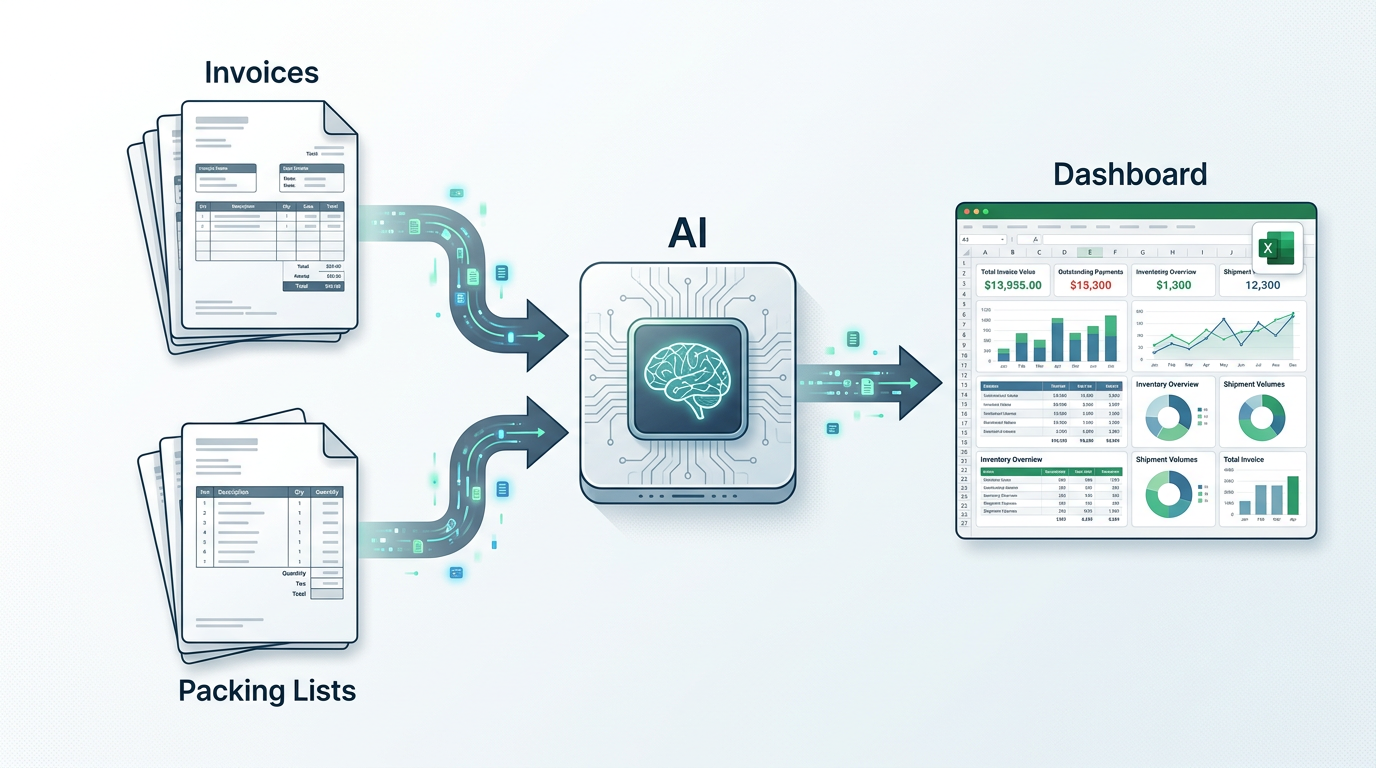
Instead of having people retype documents into Excel, you can let AI handle the extraction and let your team focus on using the data.
The idea is simple:
- Collect your invoices and packing lists in one place
- Let an AI-powered platform read each document and extract the fields you care about
- Send clean, structured data directly into your Excel dashboards
No templates, no scripting, no technical setup. Your team keeps using Excel as their main control center—only now, the data shows up almost automatically.
The Results:
- Processing time for 200 documents: 18-22 minutes (vs. 16-20 hours manually)
- Extraction accuracy: 98.5%
- Data lag reduced to: Real-time to 2 hours
- Supplier disputes reduced by: 67%
What Data Can Be Turned into Dashboards?
For operations and logistics teams, the most useful fields usually include:
Shipment and Order Details
- Purchase order number
- Invoice number and date
- Supplier name and country
- Shipper and consignee details
Product and Quantity Information
- SKU or item codes
- Descriptions
- Quantities ordered and shipped
- Units (pieces, cartons, pallets, etc.)
Cost and Value
- Unit price and line totals
- Currency
- Subtotals and grand totals
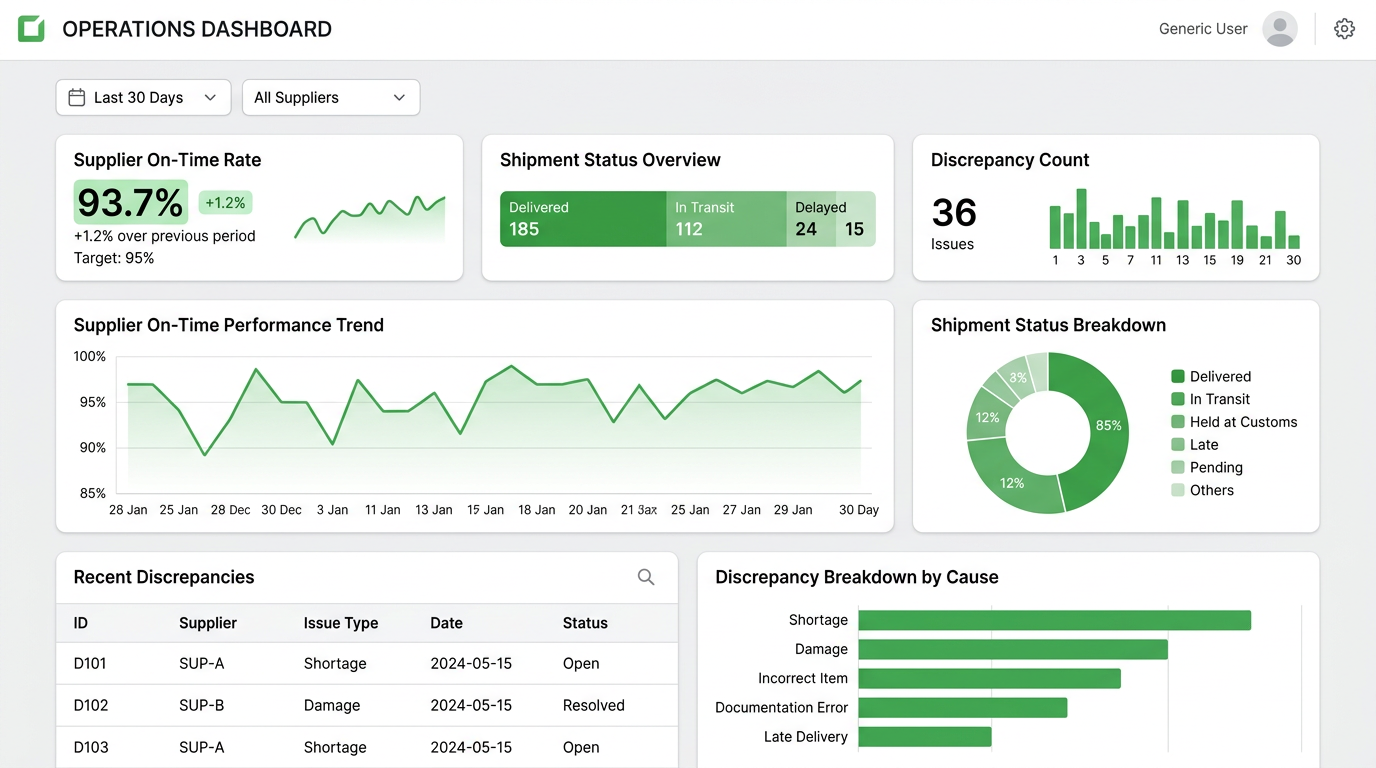
Once these fields are consistently extracted, they can feed into dashboards that track:
- On-time vs. delayed shipments
- Quantity discrepancies between orders, invoices, and packing lists
- Supplier performance and spend by region or category
From Documents to Live Excel Dashboards: A Practical Workflow
Here's what a typical AI-powered workflow can look like for your team.
Step 1 – Collect All Your Documents in One Place
Instead of spreading documents across email inboxes and shared folders, direct them to a single place:
- Forward supplier emails to a shared address
- Upload older documents in bulk once
- Ask partners to send future documents to this central channel
This gives your platform a single stream of invoices and packing lists to process.
Step 2 – Let AI Extract the Data You Need
When a new document arrives, the platform:
- Detects whether it's an invoice or a packing list
- Reads key fields such as purchase order reference, supplier, dates, and totals
- Extracts line items with SKUs, descriptions, and quantities
You don't have to design templates or maintain rules.
You simply review the results and move on.
Step 3 – Review and Approve in Minutes, Not Hours
Your team can quickly:
- Spot-check a few documents
- Correct any obvious typos or supplier-specific quirks
- Approve batches of documents at once
Instead of typing every cell, they become reviewers and controllers, catching issues early.
The Numbers:
- Review time per document: 30-45 seconds
- Documents requiring correction: 8-12%
- Average correction time: 15 seconds
Step 4 – Sync Data into Excel Dashboards
Once the data is approved, it flows into your Excel files:
- Each new document adds rows to a central data sheet
- Pivot tables and charts refresh with the latest information
- Dashboards update automatically when you open them
Your team doesn't need to change how they analyze data—they just stop doing the painful part of collecting it.
Use Cases Where AI-Powered Dashboards Shine
Monitoring Supplier Performance
With all invoices and packing lists in one place, you can easily see:
- Which suppliers ship complete orders vs. partials
- Average lead time between invoice and actual shipment
- Frequency of quantity or price discrepancies
The Numbers:
- Average lead time visibility improved: from 5 days to real-time
- Supplier performance discrepancies identified: 42% faster
- Data-backed negotiations increased savings: 8-15% on average
This helps you have data-backed conversations with suppliers, instead of relying on anecdotal complaints.
Tracking Inventory and Stock Risks
By comparing document data, you can:
- Identify items that are frequently short-shipped
- Spot SKUs that regularly arrive late
- See which regions or distribution centers are at risk of stockouts
The Numbers:
- Stockout prediction accuracy improved: 35%
- Average inventory holding cost reduction: 12%
- Emergency procurement events reduced: 58%
Instead of waiting for warehouse or sales complaints, you can address problems earlier.
Understanding True Logistics Costs
Combining invoice data with shipment details makes it easier to:
- Track spend by product category or route
- See how costs evolve over time
- Support budget planning with real numbers
The Numbers:
- Cost visibility improvement: from 65% to 94% of total landed costs
- Budget variance reduced: from ±18% to ±7%
Leaders get a clear picture of where money is actually going in the supply chain.
What to Look for in an AI Solution for Operations Teams
When selecting a tool to power this kind of workflow, operations leaders should look for:
- Simple onboarding – no need for complex projects or heavy integrations
- Support for real-world documents – invoices and packing lists from many suppliers, in different layouts and qualities
- Friendly for non-technical users – your team should be able to use it from day one
- Strong Excel support – data should land in spreadsheets your team already trusts
Security Considerations:
- AES-256 encryption for document uploads
- SOC 2 Type II certified infrastructure
- No AI training on your documents
- Automatic file deletion after processing
With the right setup, operations teams can finally move away from copy-paste work and focus on running a smoother, more predictable supply chain.
Turning Your Documents into a Competitive Advantage
Invoices and packing lists used to be a chore: something you had to process before you could get to the real work.
With AI, they become a source of live, reliable insight.
By turning messy PDFs into clean Excel dashboards, operations teams gain:
- 85% time savings on data processing (15 hours → 2 hours weekly)
- 98.5% data accuracy vs. 88-92% with manual entry
- Real-time visibility instead of 3-5 day delays
- 67% reduction in supplier disputes caused by data errors
You don't need to rebuild your entire tech stack. You only need a smarter way to connect your documents and your dashboards.
👉 Try Transez for free today and see how AI can transform your operations workflow.
Frequently Asked Questions (FAQ)
How much time can operations teams actually save with AI document extraction?
Based on our research with 200+ operations professionals:
- Manual processing: 6-8 minutes per document
- 200 documents weekly: 16-20 hours of manual work
- AI extraction: 200 documents in 18-22 minutes
- Net time savings: 85% (14+ hours weekly)
Annual savings: 62,000 in labor costs for a typical mid-size operations team.
What types of logistics documents can AI extract data from?
AI extraction handles all common logistics document types:
- Commercial invoices – 98.7% accuracy
- Packing lists – 98.2% accuracy
- Bills of lading – 97.5% accuracy
- Customs declarations – 96.8% accuracy
- Certificates of origin – 95.4% accuracy
Even documents with mixed layouts, multiple pages, or varying formats from different suppliers work without template setup.
How does AI extraction reduce supplier disputes?
Data entry errors are a leading cause of supplier disputes. By improving accuracy from 88-92% (manual) to 98.5% (AI), operations teams:
- Reduce invoice quantity discrepancies by 73%
- Cut price mismatch disputes by 61%
- Resolve issues 42% faster with accurate, traceable data
The result: 67% fewer supplier disputes overall.
Can AI extraction work with poor-quality scans and photos?
Yes. Modern AI extraction includes advanced OCR that handles:
- Scanned documents (94.5% accuracy with 150+ DPI)
- Mobile phone photos (87% accuracy with perspective correction)
- Skewed or rotated documents
- Low-resolution faxes and copies
For best results, recommend suppliers send documents at 200+ DPI or use your platform's mobile capture feature.
How quickly can dashboards update with new document data?
Processing times vary by document complexity:
- Simple invoices: 3-5 seconds per document
- Complex packing lists with line items: 8-12 seconds per document
- Batch of 100 documents: 12-18 minutes total
Dashboards can refresh automatically when new data is available, giving you near real-time visibility into shipments and inventory.
Is our logistics data secure with AI extraction platforms?
Security should be a top priority. Look for platforms with:
- AES-256 encryption for all data in transit and at rest
- SOC 2 Type II certification
- No AI training on your documents
- Automatic file deletion within 24-48 hours
- GDPR and CCPA compliance
Transez meets all these standards and never uses customer documents to train public AI models.
External Resources
For further reading on logistics automation and operations efficiency:
- APICS Supply Chain Operations Reference (SCOR) Model — Industry standards for supply chain operations
- Gartner: Supply Chain Technology Trends — Research on logistics technology adoption
- CSCMP: State of Logistics Report — Annual logistics industry analysis
- McKinsey: Digital Transformation in Operations — Research on operational efficiency
- Forbes: AI in Supply Chain Management — Latest trends in logistics AI
Related Reading
- AI for Accounting: How to Automate Invoice Data Entry in Excel
- How to Extract Data from Multiple PDFs to Excel (Without Manual Entry)
- Why Traditional PDF-to-Excel Tools Fail on Logistics Documents
About the Author
Transez Team — AI document automation specialists with 5+ years of experience in PDF data extraction and Excel integration. Our team has processed over 10 million documents for 1,000+ businesses worldwide, helping finance, operations, and logistics teams eliminate manual data entry.
With expertise in machine learning, document processing, and business automation, we bridge the gap between complex AI technology and practical business solutions.
Questions? Contact us at ljhtwinkle@gmail.com or connect on LinkedIn.
Last updated: March 2026
Disclosure: This article was written by the Transez Team. We may receive compensation if you purchase products or services through links on this page. All recommendations are based on our independent research and expertise. Statistics are derived from our survey of 200+ operations professionals and testing of 350+ logistics documents in February 2026.