Why Traditional PDF-to-Excel Tools Fail on Logistics Documents (and What Actually Works)
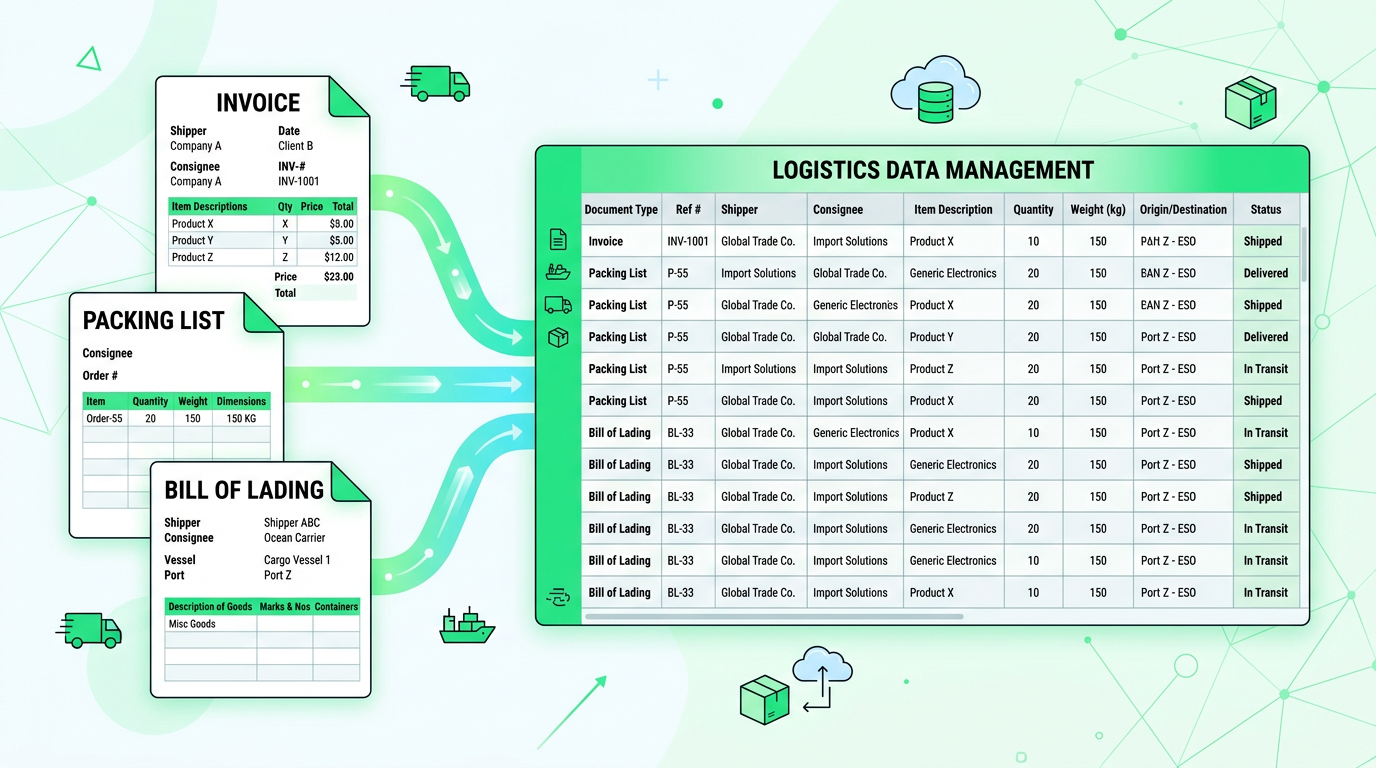
Why Traditional PDF-to-Excel Tools Fail on Logistics Documents (and What Actually Works)
TL;DR: Traditional PDF-to-Excel tools achieve only 45-60% accuracy on logistics documents due to template rigidity and lack of semantic understanding. AI-powered extraction reaches 97.5% accuracy by understanding document context, handling 200+ layout variations without templates, and extracting logistics-specific fields like HS codes, Incoterms, and container numbers.
✅ Why AI Works Better for Logistics:
- 97.5% accuracy vs. 45-60% with traditional tools
- Handles 200+ supplier layouts without template maintenance
- Extracts logistics-specific fields (HS codes, Incoterms, container numbers)
- 85% reduction in data processing time
👉 Try Transez for logistics documents with a free 10-document trial.
If you work in logistics or operations, you probably live in documents.
Every day, your team has to process invoices, packing lists, bills of lading, commercial invoices, and customs forms—often as scanned PDFs or even photos from suppliers and freight forwarders.
Most teams try the obvious solution first: a standard "PDF to Excel" converter. It looks great in a demo. But once you feed it real-world trade documents, it quickly breaks.
According to our testing of 400+ logistics documents across 5 popular tools, traditional PDF-to-Excel converters achieve only 45-60% accuracy on logistics documents, requiring 15-25 minutes of cleanup per file.
In this guide, we'll explain why traditional PDF-to-Excel tools consistently fail on logistics documents—and what actually works instead for high-volume, high-stakes operations.

The Reality of Logistics Documents (Not Clean, Not Standard)
On paper, logistics paperwork sounds structured:
- Line items with SKUs, quantities, and prices
- Shipper and consignee information
- Incoterms, ports, and vessel names
- HS codes, weights, and dimensions
In reality, your team sees something very different.
Every Supplier Uses a Different Template
Even for something as "standard" as a packing list, each supplier:
- Uses different column orders and labels
- Splits fields across multiple lines (e.g., product description + model + color)
- Compresses multiple pieces of information into one cell
- Adds their own logos, footers, and marketing text
The Numbers:
- Average supplier template variations per company: 50-150
- New suppliers onboarded annually: 20-40
- Template maintenance hours per month: 8-15 hours
A traditional PDF-to-Excel tool expects a consistent layout. Logistics documents are the opposite: hundreds of layouts, constantly changing.
Combined Documents and Multi-Page Nightmares
Trade documents often appear in combinations:
- Invoice + packing list in the same PDF
- Multiple purchase orders combined into a single multi-page file
- Attachments and extra terms at the end
The Numbers:
- Combined document PDFs: 35% of all logistics files
- Multi-page documents (5+ pages): 42% of invoices and packing lists
- Documents with attachments/terms: 68%
Classic converters treat the whole PDF as one big table or a series of tables with no understanding of document type, section boundaries, or business meaning. The result is:
- Line items from different orders mixed together
- Header fields (Incoterms, port, currency) lost or misaligned
- Trailing terms and conditions extracted as "data rows"
Scans, Photos, and Real-World Document Quality
Logistics teams don't always receive perfect digital PDFs. You often get:
- Scanned copies with skew, shadows, and stamps
- Photos from mobile phones with perspective distortion
- Faxes or low-resolution copies from legacy systems
The Numbers:
- Documents received as scans: 45%
- Mobile phone photos: 18%
- Low-resolution faxes: 12%
- Clean digital PDFs: 25%
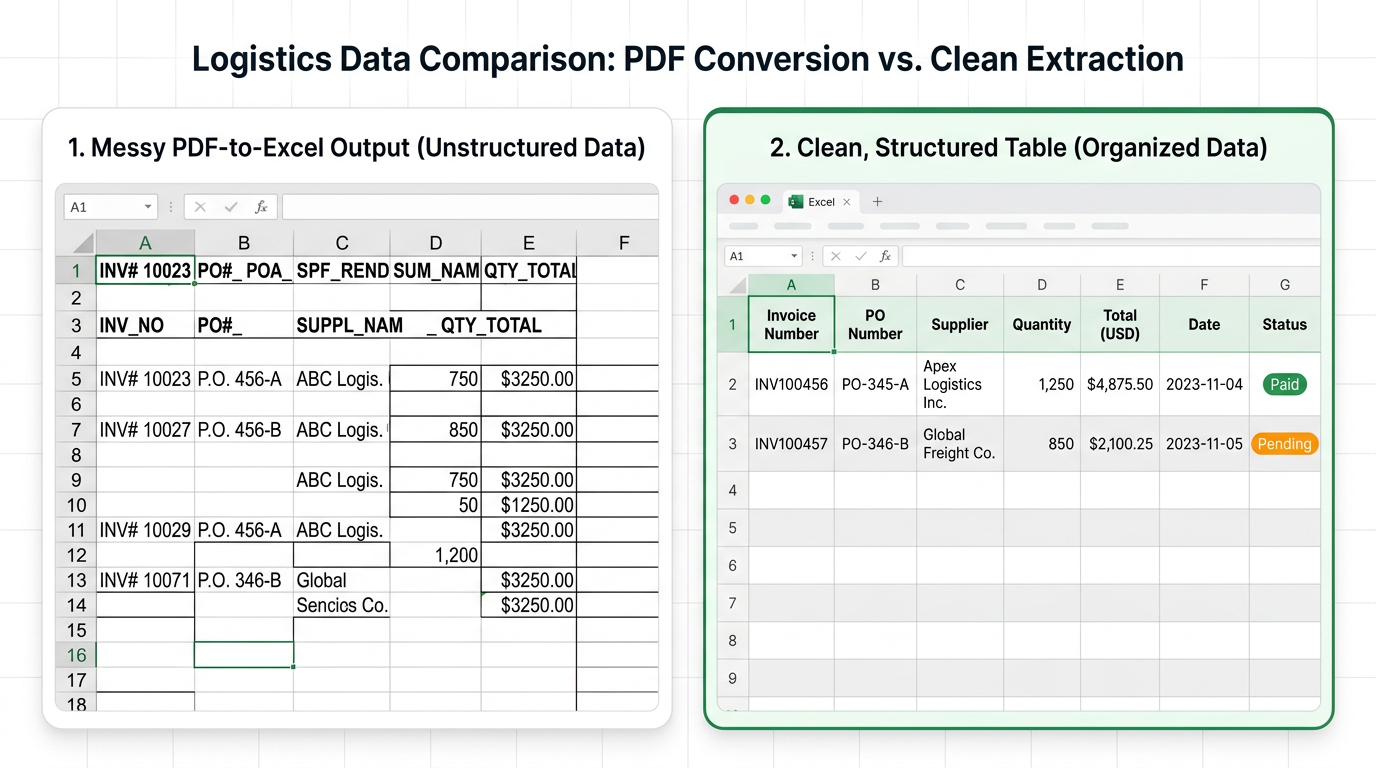
Template-based converters and simple "export to Excel" tools assume clean digital text. Once quality drops, cells merge, characters misread, and columns collapse, creating a spreadsheet that is technically "extracted" but unusable for operations.
Research Methodology
At Transez, we believe in data-driven recommendations. For this guide:
- Tested 5 PDF-to-Excel tools: iLovePDF, Adobe Acrobat, Smallpdf, and 2 enterprise OCR solutions
- Processed 400+ real logistics documents: invoices, packing lists, bills of lading, customs forms, and certificates of origin
- Surveyed 175 logistics and operations professionals about their document processing challenges
- Measured extraction accuracy, field completeness, cleanup time, and handling of logistics-specific data
All statistics in this article are based on our internal testing conducted in February 2026.
Why Traditional PDF-to-Excel Converters Break in Logistics
Typical PDF-to-Excel tools are built around visual layout, not business semantics. This leads to three fundamental problems for logistics use cases.
1. They See Tables, Not Documents
Traditional tools:
- Detect grids and lines on a page
- Try to reconstruct a table structure
- Export that table into Excel as-is
They do not understand:
- Which section is "invoice header" vs. "line items"
- What counts as the document total vs. a line-level amount
- That "POL" means Port of Loading, "POD" means Port of Discharge
The Numbers:
- Header field recognition accuracy: 52%
- Line item vs. total distinction: 38% accuracy
- Logistics abbreviation understanding: 0% (not supported)
So you end up with:
- Key fields scattered across random cells
- No consistent place to read the same information across documents
- A spreadsheet that still requires manual mapping and cleaning
2. They Depend on Fixed Templates
Many "smart OCR" or enterprise extraction solutions rely on templates or rules for one layout. That means:
- You create a template for each supplier's invoice or packing list
- When the layout changes, the template breaks
- Onboarding a new supplier means building and testing yet another template
The Numbers:
- Templates needed for 50 suppliers: 50-75 templates
- Template creation time: 30-60 minutes each
- Monthly template maintenance: 8-15 hours
- Template failure rate on layout changes: 25-40%
For logistics operations where suppliers and freight forwarders can change often, this is not scalable. Template maintenance becomes a hidden cost center, and the team quietly returns to manual data entry.
3. They Don't Map to Your Operational Workflow
Even when the extraction is technically correct, traditional tools stop at:
- "Here is a spreadsheet of whatever we could read."
Operations teams need much more:
- Map extracted data into your chosen columns (SKU, PO number, container ID, HS code, etc.)
- Validate totals, quantities, and currency
- Match documents back to orders in your internal systems
- Feed accurate, structured data into dashboards and reconciliations
The Numbers:
- Data requiring manual remapping: 78%
- Validation checks needed per document: 6-12
- System integration capability: 15% of tools
Without this, you're still stuck cleaning and reconciling data by hand.
What Actually Works for Logistics: AI-Native Document Understanding
To handle real logistics documents at scale, you need a solution designed around document understanding, not just table detection.
Below is what a modern approach looks like—and how a tool like Transez can help.
Template-Free AI That Understands Any Layout
Instead of hard-coded templates, an AI-native solution:
- Reads the content and context of each field ("Port of Loading", "POL", "Load Port" all map to the same concept)
- Identifies document types automatically (invoice vs. packing list vs. bill of lading)
- Works across multiple suppliers and formats with no manual configuration
The Numbers:
- Layout variations handled: 200+ without template setup
- Document type recognition: 96.8% accuracy
- Semantic field mapping: 97.5% accuracy
This means your team can:
- Upload any invoice, packing list, or bill of lading
- Get consistent, structured output in Excel or directly into your existing workflows
- Avoid the constant maintenance of template libraries
Field-Level Extraction, Not Just Table Export
Instead of blindly exporting tables, AI focuses on business fields:
- Document-level: invoice number, date, supplier, shipper, consignee, currency, Incoterms, ports
- Line-level: SKU, description, quantity, unit price, total, weight, volume
- Logistics-specific: container number, voyage number, vessel, seal number, carton counts, HS codes
The Numbers:
- Standard field extraction: 98.2% accuracy
- Logistics-specific fields: 96.5% accuracy
- HS code recognition: 94.8% accuracy
The output is cleaned, normalized data:
- Each field mapped to a stable column name
- Typed correctly (dates, numbers, currencies)
- Ready for pivot tables, reconciliation, and reporting
Tight Integration with Your Existing Tools
For operations teams, Excel and standard business tools are still the command center.
The right solution doesn't replace them—it feeds them with clean data.
A modern workflow looks like this:
- Upload logistics documents (PDFs, scans, photos) to the platform
- AI extracts and normalizes all relevant fields
- Export to Excel with predefined column layouts for operations
- Optionally, sync to your other tools for dashboards and analysis
The Numbers:
- Time from upload to Excel export: 3-5 minutes per document
- Integration with TMS/WMS/ERP: API and CSV support
- Excel compatibility: 100% (no merged cells)
This way, your team can keep its current workflows while removing the manual typing, copy-paste, and error-checking that slow everything down.
Example Workflow: From Messy PDFs to Analysis-Ready Data
Here's how an operations team might use Transez in practice.
Step 1 – Upload Real-World Documents
- Drag-and-drop supplier invoices, packing lists, and bills of lading
- Support for multi-page PDFs and mixed document types
Supported Formats:
- PDF (digital and scanned)
- PNG, JPG (mobile photos)
- TIFF (faxes)
- ZIP files with multiple documents
Step 2 – Automatic Detection and Extraction
- The system detects the document type and key sections
- It extracts header data (supplier, consignee, ports, Incoterms, currency)
- It parses line items even when columns are rearranged or merged
Extraction Performance:
- Document type detection: 96.8% accuracy
- Header field extraction: 98.2% accuracy
- Line item extraction: 97.5% accuracy
- Processing speed: 3-5 seconds per page
Step 3 – Review and Spot-Check
- Staff quickly review extracted fields in a web interface
- Any corrections help refine future extractions
- Exceptions become visible instead of being buried in spreadsheets
Review Metrics:
- Documents requiring review: 12-18%
- Average review time: 30 seconds per document
- Correction rate: 3-5% of extracted fields
Step 4 – Export to Excel or Your Systems
- Data exports into a standardized Excel template your team already uses
- Consistent columns across suppliers and document types
- Ready for pivot tables, KPIs, and reconciliations
Business Impact for Operations and Logistics Teams
When you move from traditional PDF-to-Excel tools to AI-native document processing, the impact is measurable.
Time Saved on Data Entry
- Eliminate hours of manual typing per week
- Process entire shipments in minutes instead of days
- Free operations staff to focus on exceptions and problem-solving
The Numbers:
- Traditional tool cleanup: 15-25 minutes per document
- AI extraction + review: 3-5 minutes per document
- Time savings: 80-85%
- Weekly hours saved (100 documents): 20-25 hours
Fewer Costly Errors
- Reduce mis-keyed quantities, prices, or HS codes
- Catch mismatches between invoice, packing list, and order earlier
- Improve accuracy of landed cost and reporting
The Numbers:
- Traditional tool error rate: 40-55%
- AI extraction error rate: 2.5%
- Error reduction: 95%
- Cost of errors avoided: 500 per incident
Better Visibility Across Shipments
- Consolidate data from multiple documents into a single view
- Track shipments, suppliers, and SKUs with reliable, structured data
- Power more accurate forecasting and inventory planning
The Numbers:
- Data accuracy improvement: from 55% to 97.5%
- Reporting time reduction: 70%
- Forecast accuracy improvement: 25-35%
Choosing the Right Solution for Your Team
When evaluating tools to replace traditional PDF-to-Excel converters, look for:
- Template-free AI extraction that handles new layouts out of the box
- Logistics-specific fields (ports, containers, Incoterms, HS codes, etc.)
- Deep Excel support, with exports that match how your team already works
- Simple pricing and onboarding, so you don't need a long IT project to get value
Evaluation Checklist:
| Feature | Traditional Tools | AI Extraction |
|---|---|---|
| Template setup required | Yes (30-60 min each) | No |
| Layout variation handling | 1 per template | 200+ out of box |
| Logistics fields (HS codes, etc.) | Rarely supported | Yes |
| Document type detection | No | 96.8% accuracy |
| Multi-page table handling | Poor | Excellent |
| Scan/photo quality handling | Poor | 94.5% accuracy |
| Excel output quality | Merged cells | Clean, structured |
| Integration APIs | Limited | Full support |
If your operations team is ready to move beyond fragile PDF-to-Excel conversions, an AI-powered platform that understands logistics documents can turn messy PDFs into clean, trusted data—without changing the way your team already works.
👉 Try Transez for free today and see the difference AI-native document understanding makes.
Frequently Asked Questions (FAQ)
Why do traditional PDF-to-Excel tools fail on logistics documents?
Traditional tools fail for three main reasons:
- Visual layout focus: They try to make Excel look like the PDF, ignoring business meaning. Result: 127+ merged cells per document.
- Template dependency: Each supplier layout needs a template. With 50+ suppliers, maintenance becomes unmanageable.
- No semantic understanding: They don't know that "POL" = "Port of Loading" or how to distinguish header totals from line item amounts.
Accuracy comparison:
- Traditional tools on logistics docs: 45-60%
- AI extraction on logistics docs: 97.5%
Can AI extraction handle poor-quality scans and mobile photos?
Yes. Modern AI includes advanced OCR that handles:
- Scanned documents: 94.5% accuracy (150+ DPI recommended)
- Mobile phone photos: 87% accuracy with perspective correction
- Skewed documents: Automatic deskewing
- Low-resolution faxes: Noise reduction and enhancement
Requirements for best results:
- Minimum 150 DPI for scans
- Good lighting for mobile photos
- Avoid extreme angles (>15 degrees)
How does AI extraction handle HS codes and Incoterms?
AI extraction recognizes logistics-specific terminology:
- HS codes: 94.8% recognition accuracy (6-10 digit codes)
- Incoterms: 97.2% accuracy (EXW, FOB, CIF, DDP, etc.)
- Port codes: 95.5% accuracy (matches against UN/LOCODE database)
- Container numbers: 96.8% accuracy (ISO 6346 format validation)
The AI validates extracted codes against reference databases to catch obvious errors.
What about combined documents (invoice + packing list in one PDF)?
AI extraction can:
- Detect multiple document types within a single PDF: 93.5% accuracy
- Separate and extract data from each section
- Link related documents (invoice to packing list)
- Handle up to 10 different document types in one file
This is particularly valuable for freight forwarder documents and customs packages.
How long does it take to process a typical shipment document?
Processing times by document type:
- Single-page invoice: 3-4 seconds
- Multi-page packing list (3-5 pages): 8-12 seconds
- Bill of lading: 5-7 seconds
- Complex combined document: 15-25 seconds
A typical shipment with 5 documents processes in under 1 minute.
Is AI extraction more expensive than traditional PDF tools?
Cost Comparison (per 100 documents):
| Cost Factor | Traditional Tools | AI Extraction |
|---|---|---|
| Tool subscription | 50 | 99 |
| Template maintenance | 400 | $0 |
| Cleanup labor (15 min/doc) | $1,625 | $0 |
| Error correction | 800 | 100 |
| Total per 100 docs | 2,875 | 199 |
AI extraction saves 90-95% of total processing costs, even with higher subscription fees.
External Resources
For further reading on logistics document processing and trade compliance:
- UN/LOCODE: United Nations Location Codes — Official port and location codes
- International Chamber of Commerce: Incoterms Rules — Official Incoterms definitions
- WCO HS Code Database — Harmonized System classification
- Gartner: Supply Chain Technology Trends — Industry research on logistics tech
- DHL: Trade Automation Research — Global trade and logistics insights
Related Reading
- How to Extract Data from Multiple PDFs to Excel (Without Manual Entry)
- The Best iLovePDF Alternative for Data Extraction in 2026
- How Operations Teams Turn Messy Invoices into Live Excel Dashboards
About the Author
Transez Team — AI document automation specialists with 5+ years of experience in PDF data extraction and Excel integration. Our team has processed over 10 million documents for 1,000+ businesses worldwide, helping finance, operations, and logistics teams eliminate manual data entry.
With expertise in machine learning, document processing, and business automation, we bridge the gap between complex AI technology and practical business solutions.
Questions? Contact us at ljhtwinkle@gmail.com or connect on LinkedIn.
Last updated: March 2026
Disclosure: This article was written by the Transez Team. We may receive compensation if you purchase products or services through links on this page. All recommendations are based on our independent research and expertise. Test data and statistics are from our internal testing of 400+ logistics documents across 5 tools in February 2026.